Your songs, sounding like records.
You can write a song and play it. FirstTake handles the producer part: drums and bass that follow your chords, effects already set up for your style, and one button that mixes everything. It explains every step it takes, so you learn as you go.
Free account · just your email, no password · no credit card
- Song set up
- Record
- Make it sound good
- Settings explained
- Before / after
- Pick chords
You know the song. The studio talks a different language.
Compression, EQ, sidechain, sub-bass. Most recording software assumes you already speak it. FirstTake uses words that describe what you hear, does the setup for you, and shows the real settings when you're curious.
| Ch | Engineers say | FirstTake says | What you hear |
|---|---|---|---|
| 01 | Compression | Even out | Quiet words come up, loud notes come down, so nothing gets lost in the mix. |
| 02 | Reverb send | Space | Puts your voice in a room. More space sounds bigger and further away. |
| 03 | EQ, high shelf | Brightness | More air and clarity, or darker and softer. |
| 04 | High-pass filter | Clean up rumble | Removes traffic, footsteps and breath pops you never noticed recording. |
| 05 | Sidechain ducking | Make room for the kick | The bass dips each time the kick hits. The pumping sound of dance music. |
| 06 | Saturation | Grit | Warm distortion, like tape or an amp. |
From first chord to finished song in four steps.
Pick a style
Each style sets the tempo, drum kit, grooves, bass, sounds and mix the way a producer in that genre would. New styles are single files, so more keep arriving.
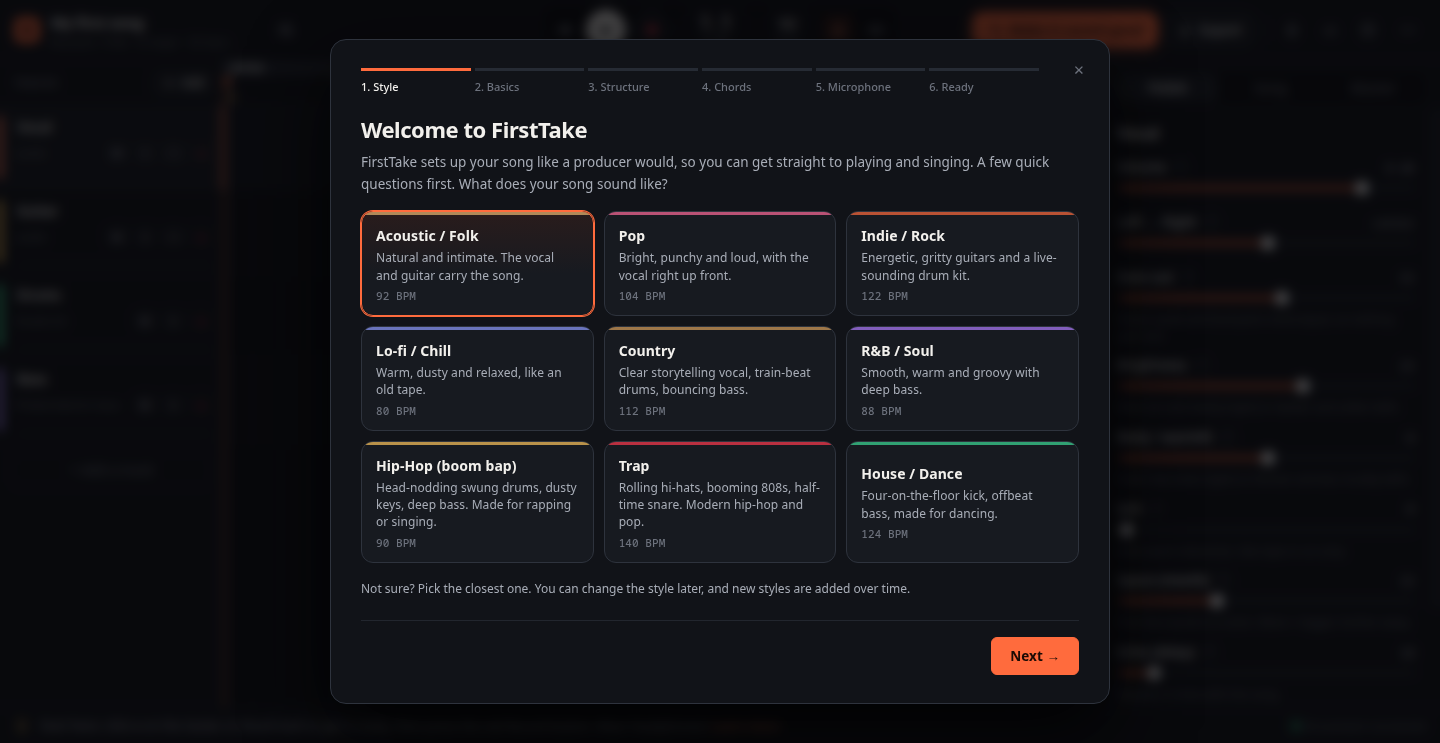
Build the song by clicking chords
Lay out your intro, verses, pre-chorus, chorus and bridge. Then pick each section's chords from buttons that fit your key. Green chords feel like home, blue ones move away, orange ones build tension.
The drums, bass and keys rewrite themselves to match, and get bigger in the chorus.
Record your guitar and voice
Arm a track and press record. You get a bar of clicks to count you in, a level meter that warns before you distort, a built-in guitar tuner, and automatic correction for the delay your computer adds.
Cut, trim and fade takes like a pro, and undo anything.
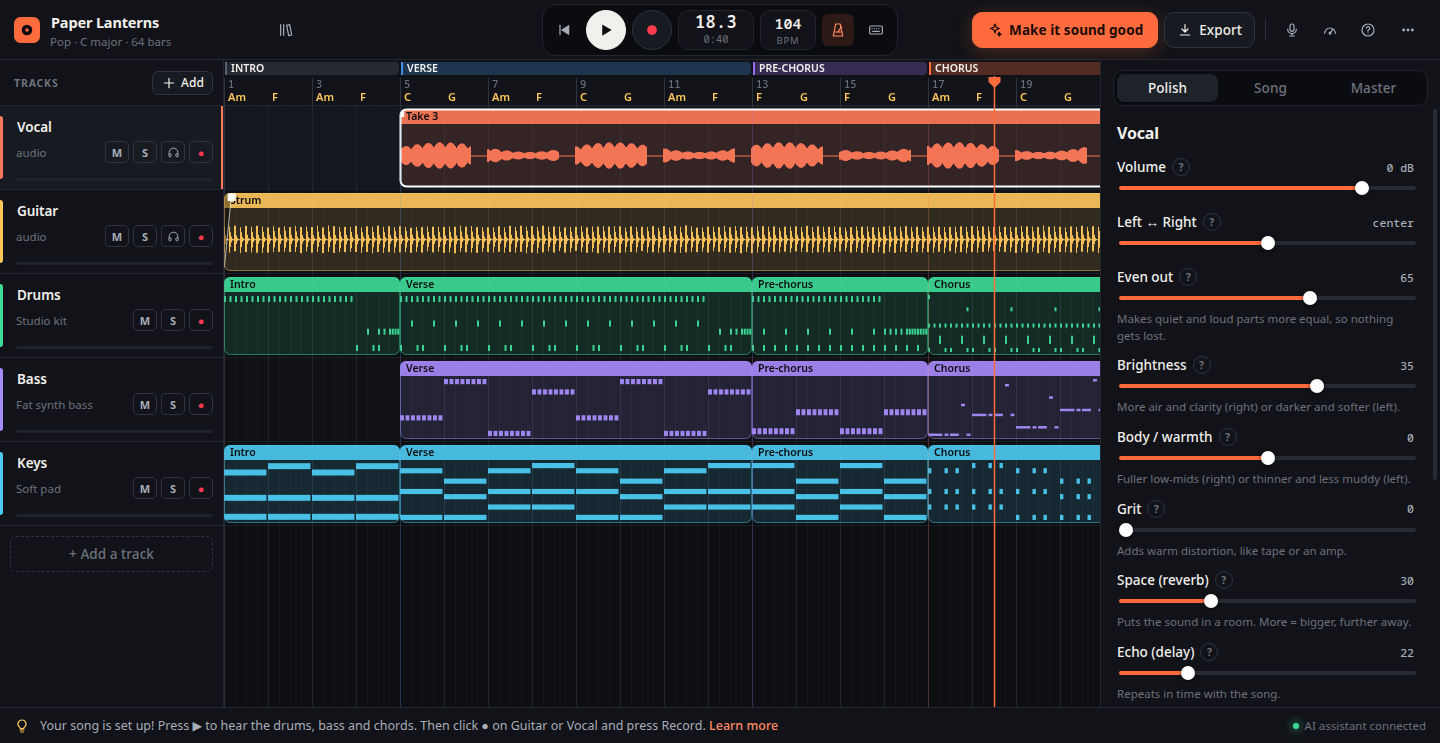
Press Make it sound good
FirstTake listens to each recording and does what a producer would by hand. Then it tells you exactly what it changed and why.
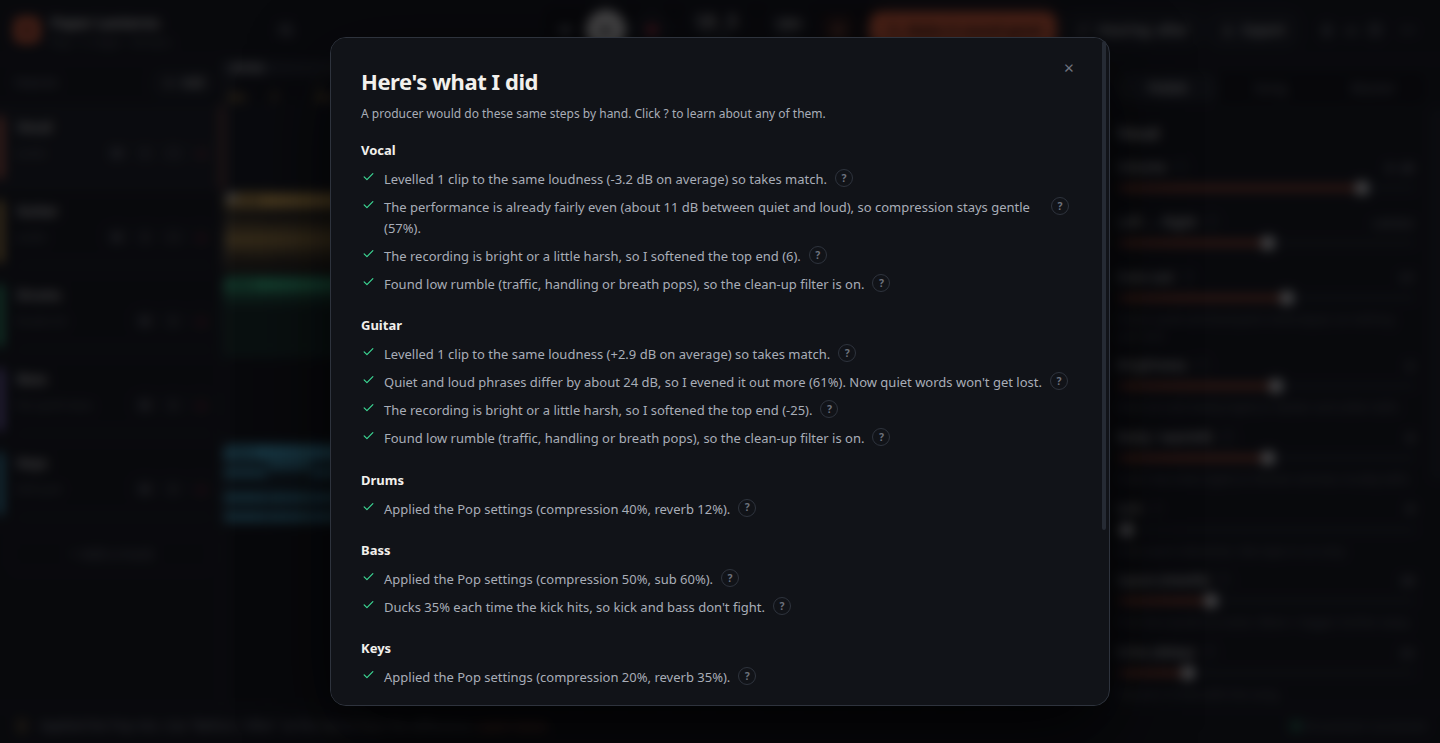
One button. Then hear the difference.
It measures how loud each take is, how much your performance jumps between quiet and loud, whether the recording is dull or harsh, and whether there's rumble underneath. Doubled guitars get spread left and right. Bass gets out of the kick's way. The whole song gets glued together and made loud without distorting.
Write it together. Nobody's work gets lost.
Your songs save to your account as you work, so they're on every computer you sign in from. Send a friend a link to listen, or invite your co-writer to work on the same song.
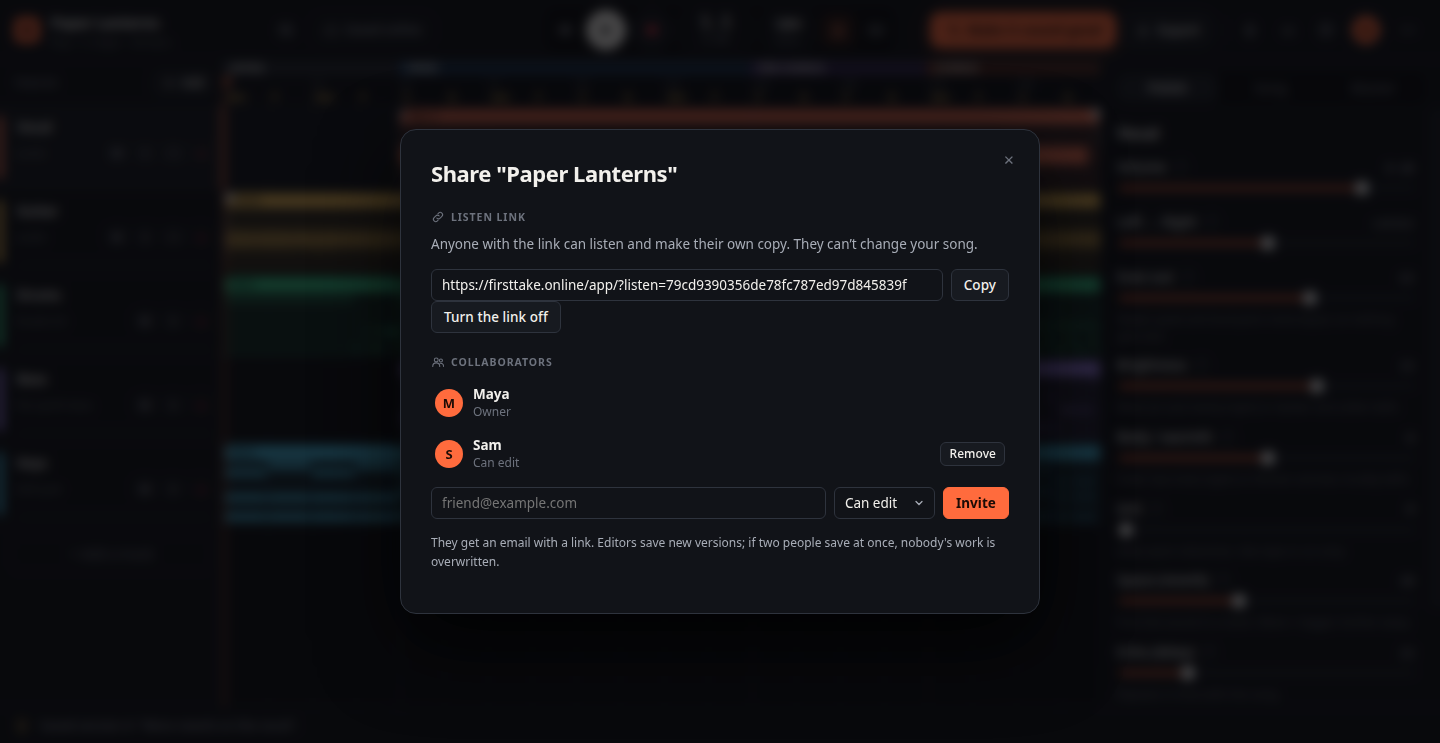
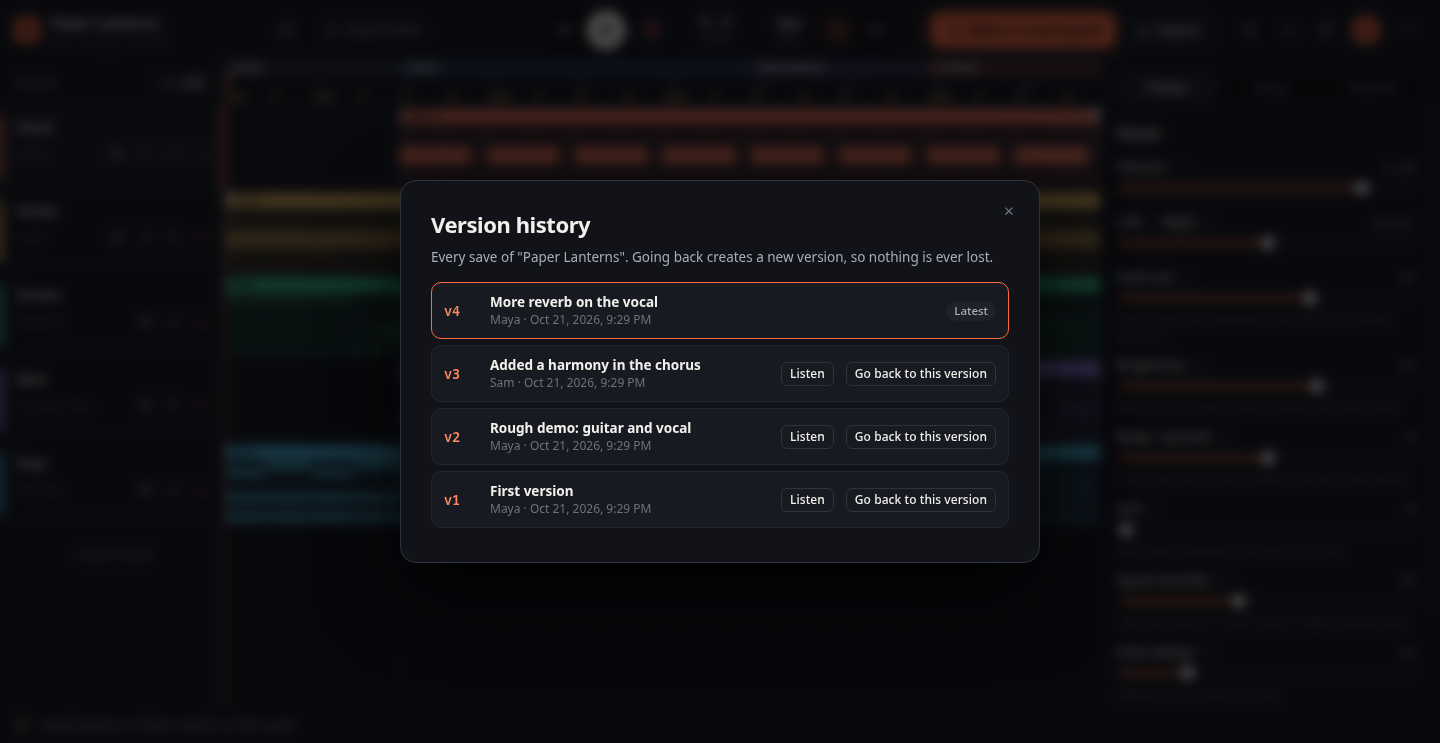
Never lose a take
Every change saves to your account a few seconds later. Mark milestones with a named version like "finished chorus".
Share in one click
Anyone with the link hears your song in their browser. Turn the link off whenever you like.
Remix a friend's song
Listeners can copy your song into their own account to try their own ideas. Your original never changes.
Invite your co-writer
Invite people by email as editors or listeners. They don't need a paid plan to work on your song.
Save at the same time
If two people save at once, the second gets to keep their changes as a copy or load the newer version. Nothing is silently replaced.
Go back any time
See who saved what and when, listen to any earlier version, and bring it back with one click.
Swap any sound. Bring your own samples.
Every drum, bass and keys sound is a choice, not a default you're stuck with.
Six built-in kits
Studio, rock, boom bap, 808, lo-fi and electronic. Swap a single drum for another kit's version.
Drop in a sample pack
Point FirstTake at a folder and it builds a kit by reading the file names: kick, snare, hats, claps.
Kick, snare, hats, percussion
Switch each part on or off, set its level, solo it, and export it as its own file.
808, sub, picked, synth
Choose the pattern, the register and the note length. Add walking notes into chord changes or an 808 glide.
Piano to strings
Electric piano, pads, strings, organ, bells and lead synth, playing held chords, stabs or arpeggios.
MIDI keyboard or laptop keys
Plug in a MIDI keyboard, or play notes on your computer keyboard and record them.
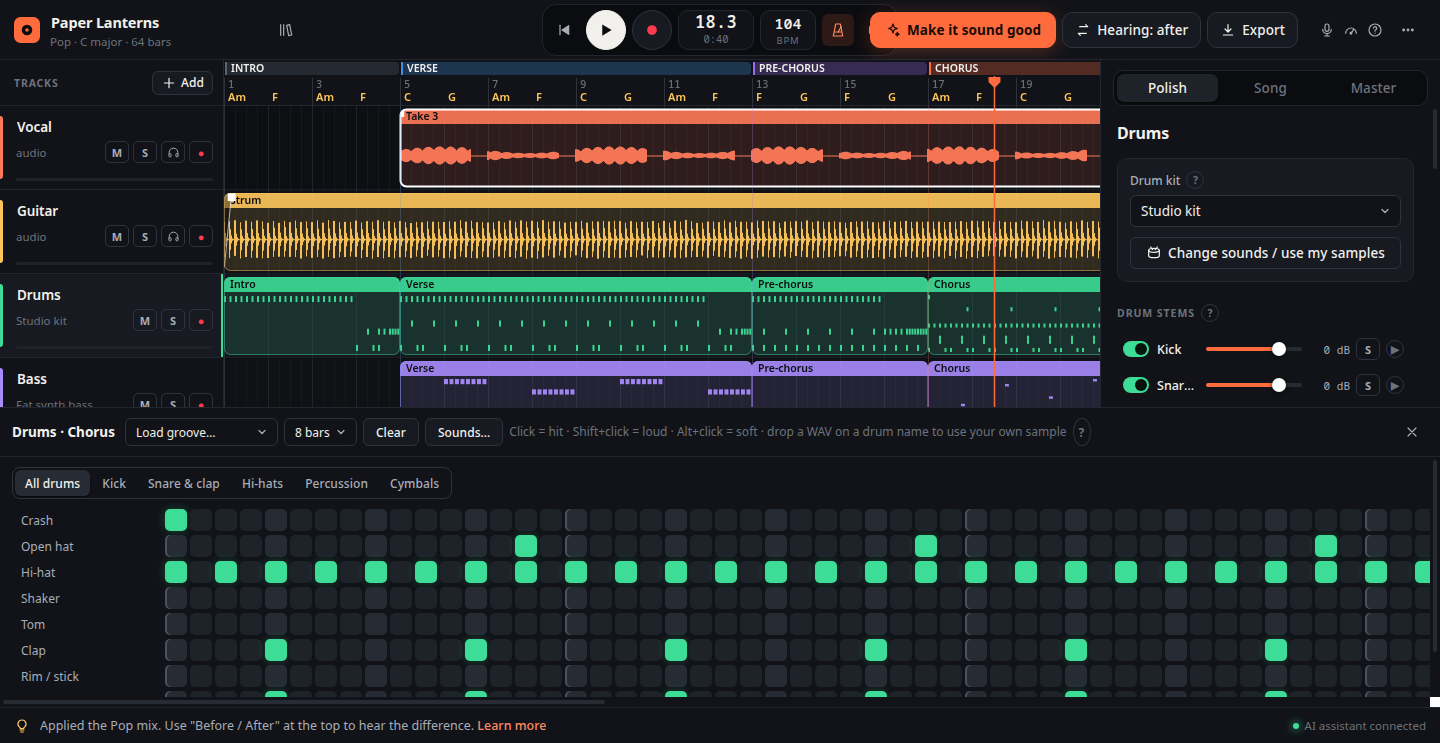
A step sequencer that hides what you don't need
Pick a stem to see only those drums, click squares to add hits, and drop any WAV on a drum's name to use it.
Training wheels you can take off.
A guided tour the first time you open it. A question mark next to every control. 44 short explanations, from "What's sub-bass?" to "Why does my recording sound late?". And Producer view, which shows the real numbers underneath the friendly names:
When you outgrow it, take everything with you.
The Graduation pack exports your song in the format every studio app understands. Drag it into Ableton Live, Reaper, Logic, FL Studio or Ardour at bar 1 and keep going.
No lock-in
Your songs live in your account, and you can always download a song as a single project file or a Graduation pack to take it anywhere.
Nothing to install. Open it and record.
FirstTake runs entirely in your web browser. Sign in with your email and your songs are saved to your free account, ready to open, share or work on together from any computer.
Open in your browser
- Everything in this page: styles, structure, chord picker, recording, Make it sound good, export
- Works in Chrome, Edge and Brave on Windows, Mac and Linux
- Free account: sign in with your email, no password. Songs save to your account automatically.
- Share listen links and invite collaborators
Sign in with your email, allow the microphone when your browser asks, and wear headphones.
Start free. Upgrade when you have more songs to make.
Every feature is in the free plan. Pro is for people who want to work on more than one song at a time.
forever
- 1 song, with as many takes and versions as you like
- 250 MB of recordings
- All 9 styles, every sound and drum kit
- Make it sound good, chord picker, tuner, guided tour
- Listen links, copies and collaborators
- Export WAV and the Graduation pack
per month · cancel any time
- Unlimited songs
- 10 GB of recordings
- Everything in Free
- Supports an independent music project
Songs you're invited to don't count against your plan, so collaborating is always free. Payments are handled securely by Stripe.
Questions people ask.
Does it cost anything?
No, to start. A free account includes one complete song with every feature, including sharing and collaborators. For more songs there's a Pro monthly subscription you can cancel any time (see Pricing).
Do I need an account?
For the online version, yes: a free account with just your email address. There's no password; we email you a sign-in link that works once.
How does saving work?
Automatically. A few seconds after any change your song is saved to your account, and the button at the top says "Saved online". You can also save a named version to mark a milestone, and go back to any earlier version from the version history.
Can I work on a song with someone else?
Yes. Invite them by email as an editor or a listener. They sign in with that address and the song appears in their list. Songs you're invited to don't count against your plan.
What happens if we both save at the same time?
Nobody's work is overwritten. The person who saves second sees who saved first and chooses to keep their changes as a separate copy or load the newer version.
How much can I store?
Free accounts hold one song and 250 MB of recordings, which fits a full song with several takes of each part. Pro holds unlimited songs and 10 GB.
What if I cancel Pro?
Pro stays active until the end of the month you've paid for. After that your songs stay in your account and you can still open, play, share and download them; you just can't start new ones while you're over the free limit.
Can I download my songs?
Always. Export a WAV to share, a Graduation pack with stems and MIDI for Ableton, Reaper, Logic or FL Studio, or a project file to back up.
What do I need to record?
Headphones and a microphone. A USB mic or a small audio interface sounds best, but a laptop mic works for a first try.
Can I use VST plugins or Splice?
Not yet. FirstTake's own effects and kits are built in, and you can load any sample files you own, including Splice downloads. Plugin hosting and a Splice browser are planned.
Is my music private?
Yes. Your songs are only visible to you and the people you share them with. We don't sell data, show ads or use tracking. Read the privacy policy.
Will it make me sound like a professional?
It gets you much closer: balanced, clear, loud and in time. Your performance and your song still do the heavy lifting.
Stop sending voice memos.
Sign up with your email and have your first song set up in two minutes.
Start free